How Face ID and Fingerprint Sensors Actually Work
Inside the infrared, capacitive, optical, and ultrasonic hardware your phone uses to recognize you — and why biometric authentication sometimes fails.
Table of Contents
You pick up your phone, glance at it, and it unlocks before you’ve finished the motion.
In that fraction of a second, an iPhone by default confirms you’re looking at it. Once the TrueDepth camera detects an attentive face, it projects and reads thousands of infrared dots to build a depth map of your face, along with a 2D infrared image. That data is signed and sent to the Secure Enclave — an isolated security subsystem inside the phone’s main chip — and compared against a stored mathematical model. No photo is kept: the Secure Enclave discards captured face images as soon as it has calculated the mathematical representation.
The fingerprint sensor under the screen of the phone next to yours does the same job with completely different physics.
Understanding how Face ID and fingerprint sensors work comes down to two separate questions. What does the sensor physically measure? That determines how it fails. And what is it certified to protect? That is decided by a security class, a secure hardware pipeline, and the passcode underneath it all.
Coverage of biometrics usually starts with software. After 20+ years in PCB electronics manufacturing and technical sales, I think the more useful way in is the hardware: what sits in the display stack, what gets paired at the factory, and what breaks when either changes.
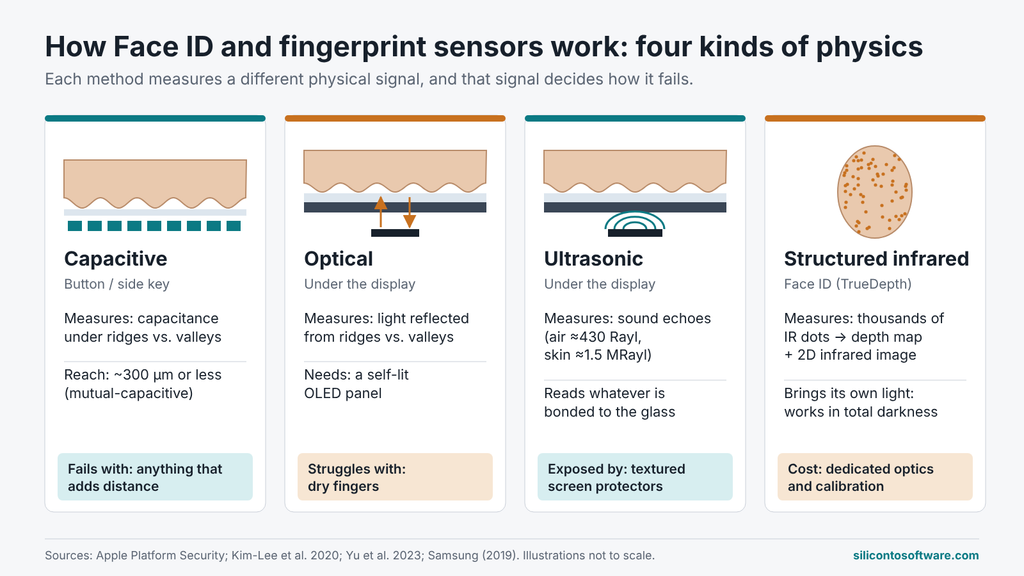
How Fingerprint Sensors Work: Capacitive, Optical, and Ultrasonic
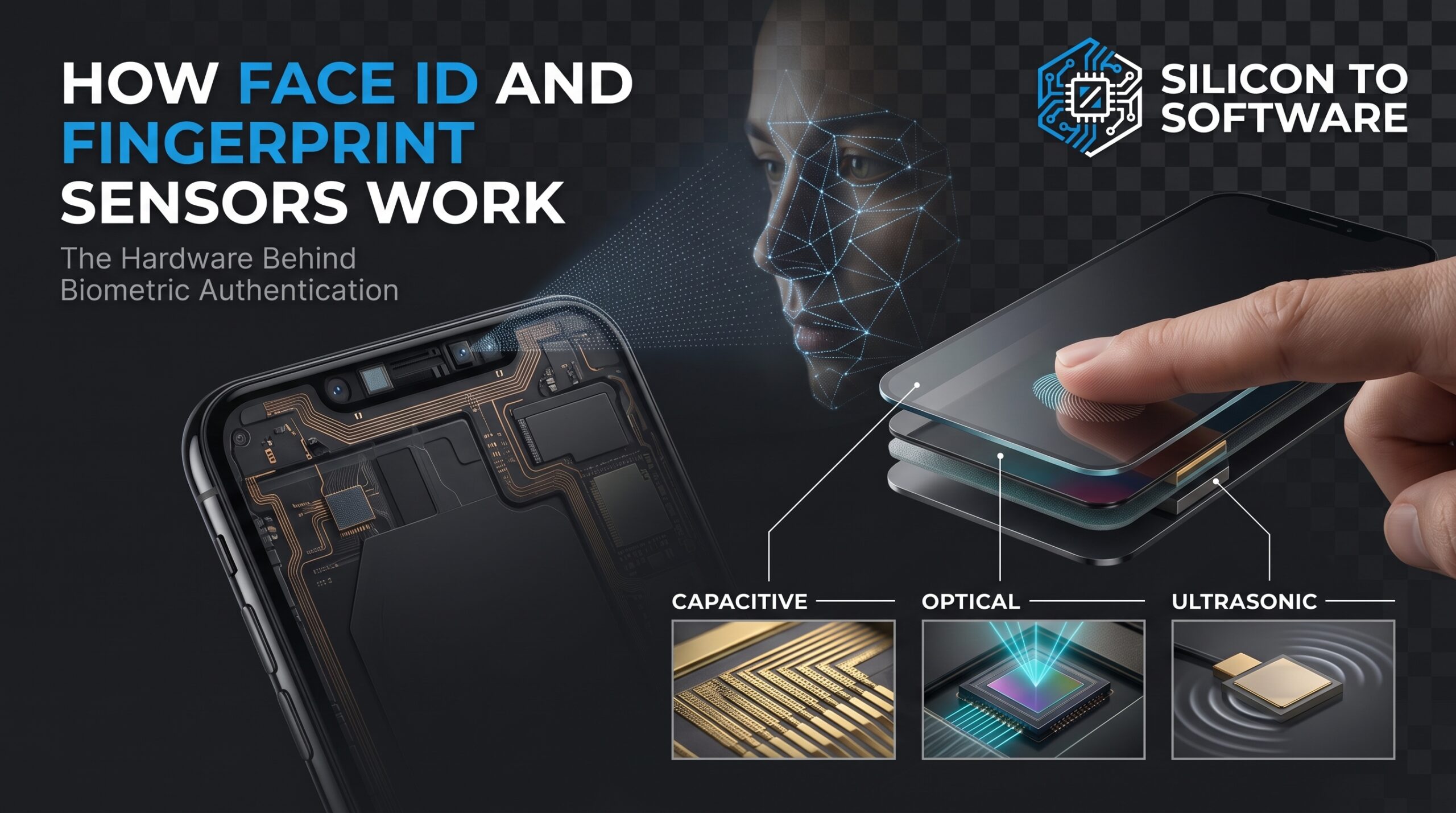
Capacitive fingerprint sensors: why they live in buttons
Apple’s Touch ID is the best-documented capacitive design. It places the sensor beneath a sapphire crystal button, while a surrounding steel ring detects the finger to start the read. The sensor then uses capacitive touch to image small sections of the print from the subepidermal layers of the skin.
The mechanism is distance. A ridge sits closer to the electrodes than a valley, so the capacitance measured at each electrode changes by a different amount under each. In mutual-capacitance designs, a finger lowers the measured capacitance; in self-capacitance designs, it raises it. Apple doesn’t publish which scheme Touch ID uses.
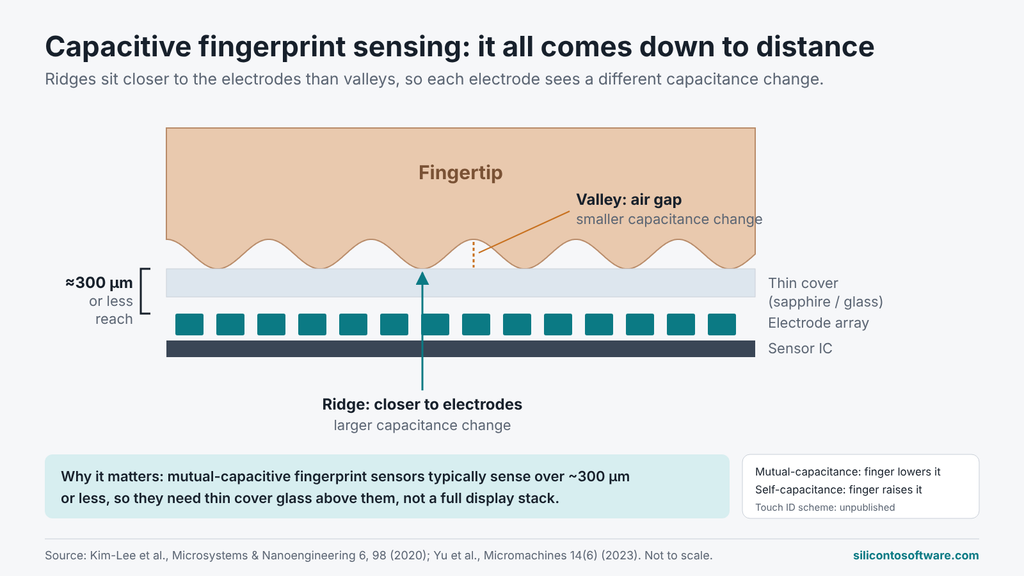
Range is the constraint. Mutual-capacitive fingerprint sensors typically have a usable sensing distance of about 300 µm or less, so they need thin cover glass directly above them. My interpretation: that short reach is a large part of why conventional capacitive readers were historically packaged in buttons and side keys rather than under a full display stack.
Optical under-display fingerprint sensors
Optical sensors read through the display. They separate ridges from valleys by the difference in reflected light. OLED panels make this practical because they are self-emitting — the display lights the finger — while micro-collimators keep the returning signals from overlapping.
The weakness follows from the method. The sensor reads a 2D image through several layers, and it struggles with dry fingers that can’t make uniform contact with the cover; a ridge that isn’t touching properly can read as a valley, because part of the light reflects off the cover surface instead of entering the finger. Android’s spoof-test protocol targets the same 2D weakness: optical sensor testing includes lifting a latent print off a surface and placing it on the sensor.
In commercial phones, optical and ultrasonic under-display sensors have been paired with OLED panels; LCD backlights complicate the light path, and under-LCD approaches remain largely in research.
Ultrasonic under-display fingerprint sensors
Ultrasonic sensors use sound instead of light. They exploit a large acoustic impedance mismatch: air-filled valleys sit around 430 Rayl and skin ridges around 1.5 MRayl, so the two return very different echoes.
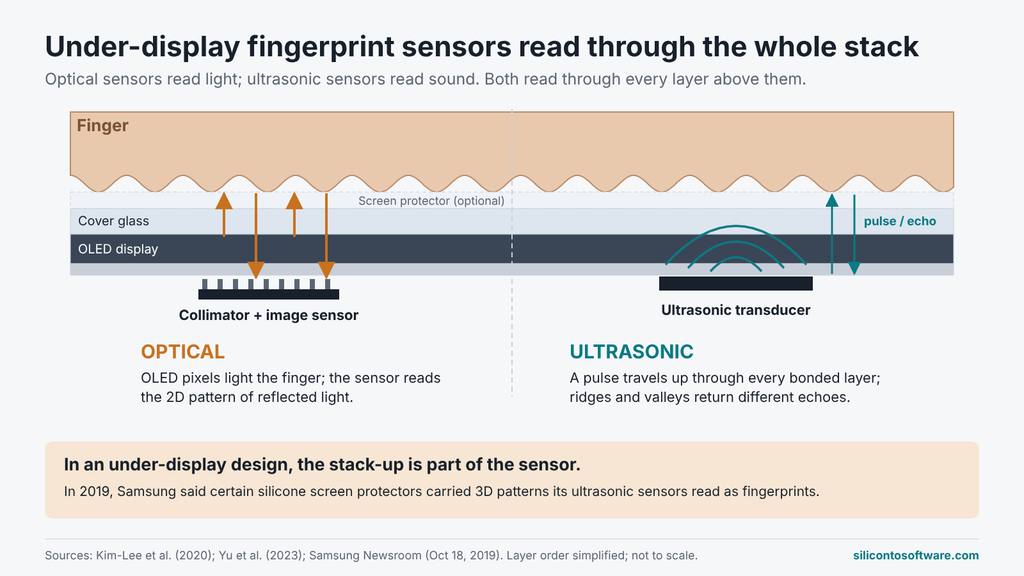
Qualcomm announced its 3D Sonic Sensor in December 2018 as the first commercial ultrasonic fingerprint solution supported under the display, with phones following in 2019, and claimed it could read accurately through contaminants. That is a company claim. Published research describes ultrasonic sensing as relatively tolerant of small amounts of dirt or moisture — but still lists recognition time, dry-finger recognition, and manufacturing yield as engineering challenges.
When a screen protector became the fingerprint
The Galaxy S10 exposed a less obvious failure mode. Samsung said its ultrasonic sensors had unlocked devices after reading three-dimensional patterns on certain silicone screen protectors as users’ fingerprints. It advised affected S10 and Note10 owners to remove those covers, delete their fingerprints, and re-register, and issued a software patch.
The failure began in the sensing stack: the protector introduced a three-dimensional pattern the ultrasonic system could interpret as fingerprint information. Samsung didn’t publicly detail which downstream processing stages contributed, and the fix shipped as software. Either way, the engineering lesson holds: in an under-display design, the stack of glass, adhesive, and accessories is part of the sensing system.
How Face ID Works — and Why Face Unlock Isn’t One Technology
2D camera face unlock
The simplest systems compare a flat image from the front camera with an enrolled one. With no depth information, they are the most exposed to flat spoofs. Android’s test protocol lists printed photos, photos on a display, and videos as in-scope attacks.
Android limits what these systems may protect. A Class 1 biometric can unlock the phone but can’t expose an API to apps — no banking sign-ins, no payments. Google’s own lineup shows where the line falls: Face Unlock exists on Pixel 7 and later, but using it to verify you in apps or approve purchases is limited to Pixel 8 and later.
Structured light: how Face ID builds a depth map
Face ID depends on dedicated infrared hardware in the TrueDepth module:
- Attention check. By default, Face ID confirms the user’s eyes are open and directed at the device. (It can be turned off for accessibility, but is always required with Face ID with a mask.)
- Depth capture. It projects and reads thousands of infrared dots, producing a depth map and a 2D infrared image.
- Anti-replay. It randomizes the capture sequence and projects a device-specific random pattern.
- Secure matching. A portion of the Secure Neural Engine, protected within the Secure Enclave, converts the data to a mathematical representation and compares it with the enrolled model. On A14 and later chips, the Secure Neural Engine is a secure mode of the main Neural Engine, with a dedicated hardware controller resetting its state on every switch between ordinary and Secure Enclave work.
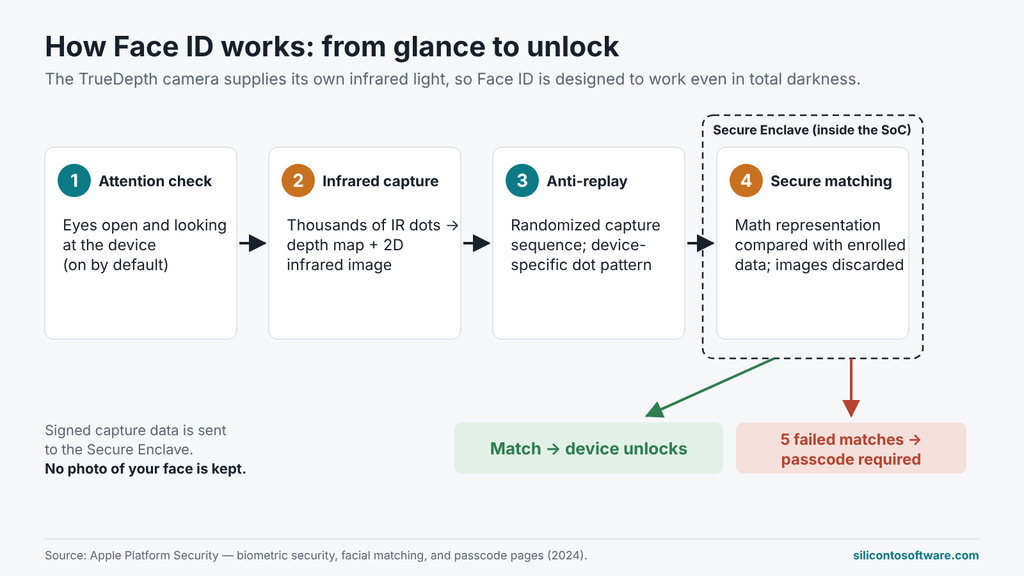
A separate neural network trained to spot spoofing defends against photos and masks. Because the phone supplies its own infrared illumination, Face ID is designed to work indoors, outdoors, and even in total darkness. The cost is dedicated optics, front-panel area, and production calibration.
Camera plus machine learning: Pixel 8’s route to Class 3
This is where the assumption that secure face unlock requires dedicated infrared hardware stops working.
Pixel 4 used its own dedicated infrared depth system. Because its face unlock had to work at high speed and in darkness, Google built uDepth, an infrared active stereo sensor using two IR cameras and an IR pattern projector.
Google then removed that hardware. For Pixel 8, Google said machine learning advances let Face Unlock meet the strongest Android biometric class, usable for banking and Google Wallet, crediting the Tensor G3’s security core working with the Titan M2 chip.
The trade-off is in Google’s own documentation: Face Unlock might not work in insufficient light or with a face cover or sunglasses, and someone who looks a lot like you, such as an identical sibling, can unlock it.
From a hardware-integration standpoint, removing those dedicated IR components reduces part count and front-panel complexity. It also removed the active illumination that let Pixel 4 operate in darkness.
My interpretation: dedicated depth hardware no longer predicts security class. Check the class, not the “3D” or “AI” marketing. But treat the class as a floor, not a ranking. Class 3 certifies that a system passed a defined test protocol — not equal resilience across different sensing technologies — and two Class 3 systems can still behave very differently against attacks outside that test.
Where Biometric Data Is Stored: The Secure Enclave and Secure Hardware
Apple and Google both state that the enrolled biometric data for these systems stays on the device rather than being uploaded to their servers, and that raw captures aren’t kept.
On iPhone, matching happens in the Secure Enclave, a dedicated secure subsystem integrated into the Apple SoC. It is isolated from the main processor and designed to protect data even if the application processor’s kernel is compromised. On current iPhones it isn’t a separate chip.
- Fingerprints: Touch ID holds the raw scan briefly in encrypted memory, then discards it. Its analysis is deliberately lossy, dropping the minutiae needed to reconstruct the actual print.
- Faces: Face ID data is encrypted, available only to the Secure Enclave, and never sent to Apple or included in backups. What Face ID keeps is math: after a successful match, it may reuse a new representation for a limited number of matches, then discard it.
Google says the same for Pixel: the face images used to build the model aren’t stored, and the model never leaves the device. Android writes the principle into its compatibility requirements — a pipeline counts as secure only if a kernel or platform compromise can’t read raw biometric data or inject synthetic data.
Why the biometric sensor is paired to the board
From a manufacturing standpoint, this is the most consequential detail in Apple’s documentation.
On iPhone with built-in Touch ID, the sensor talks to the Secure Enclave over an SPI bus that the main processor forwards but can’t read. It’s encrypted with a key derived from a shared key provisioned at the factory for each sensor and its matching Secure Enclave — different for every sensor, Apple says. The device root key follows the same pattern: a random UID is fused into the SoC at manufacturing and protects Face ID and Touch ID data.
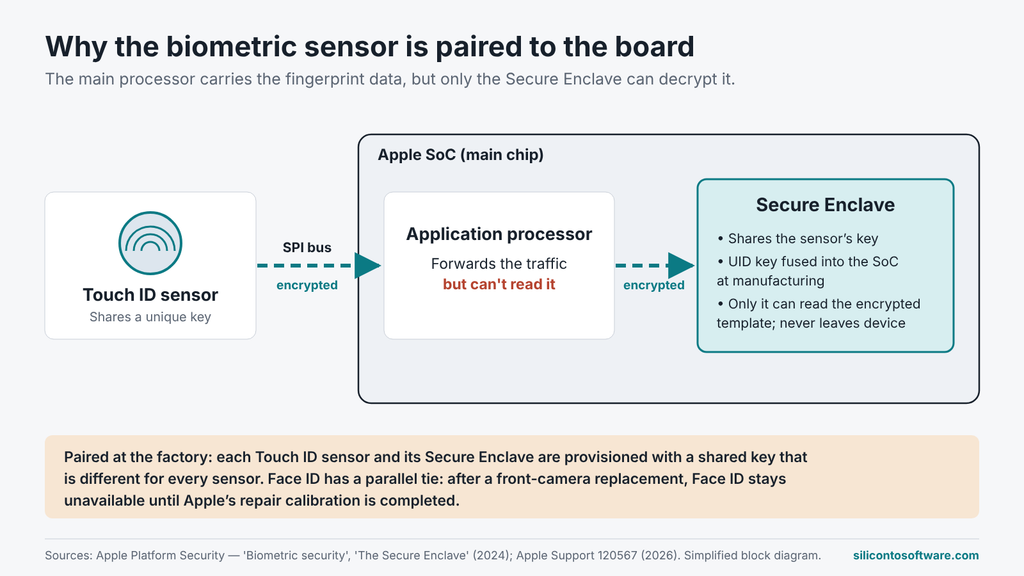
Face ID has its own version of this tie, documented in Apple’s repair process. After a front camera is replaced with a genuine part, Face ID can’t unlock the device, authorize payments, or sign in to apps until calibration is completed through Apple’s Repair Assistant. On iPhone 14 and later, a replaced front camera won’t work at all until the repair is completed or the phone is restored. Starting with iPhone 16, a front camera from another iPhone of the same model can be reused, flagged “Used” after calibration.
Engineering inference: the lockout is enforced by Apple’s calibration and repair process, not by any physical inability of a replacement module to talk to the board. The TrueDepth module is a calibrated component that must be re-matched to the device that receives it, and that shapes repair, refurbishment, and reverse logistics as much as security.
Face ID and Touch ID Accuracy: What “1 in a Million” Means
Apple’s Platform Security Guide (pages dated December 19, 2024) publishes these Apple-reported figures:
| Biometric | Probability a random person unlocks the device |
|---|---|
| Face ID / Optic ID (including Face ID with a mask) | Less than 1 in 1,000,000 |
| Face ID, two enrolled appearances | Up to 1 in 500,000 |
| Touch ID, one finger | Less than 1 in 50,000 |
| Touch ID, five fingers | Up to 1 in 10,000 |
Face ID’s false-match probability is higher for twins, look-alike siblings, and children under 13, and higher still in those cases with mask mode.
Every one of these figures describes a random stranger — not an attacker holding a mold of your finger. They are also one side of a trade-off: tuning a matcher for fewer false accepts means more genuine attempts get rejected, and Apple’s published figures don’t include the paired false-rejection rate.
Android separates those threats with two metrics. False Acceptance Rate (FAR) measures how often random wrong inputs are accepted, and doesn’t show how a model holds up against targeted attacks. Spoof Acceptance Rate (SAR) measures how often physical presentation attacks — fabricated fingerprints or facial facsimiles — are accepted. For capacitive and ultrasonic sensors, Android’s recommended spoof materials include Knox gelatin, Elmer’s glue, and latex paint.
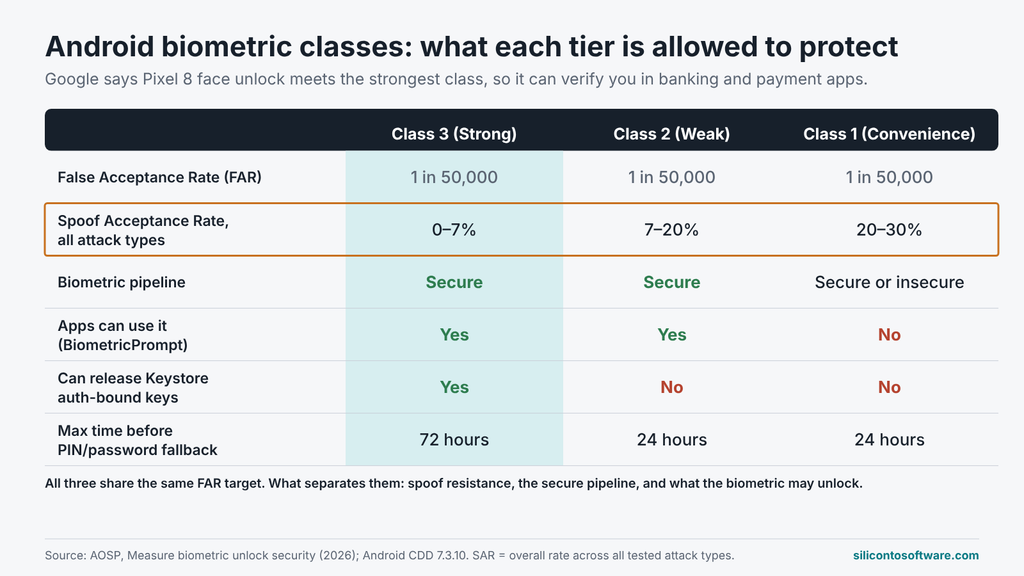
All three Android classes share the same 1-in-50,000 FAR target. Class 2 and Class 3 both require a secure biometric pipeline; Class 1 may be insecure or secure. Class 3 adds the strictest spoof-resistance requirements — including an overall SAR of 0–7% across the tested attack types (presentation attack instrument, or PAI, species) — and is the only class that can authorize Keystore-bound authentication. Class 2 can use BiometricPrompt but can’t release Keystore auth-bound keys.
How Face ID and Fingerprint Sensors Work Is Also How They Fail
Each failure traces back to one physical dependency:
| Method | Depends on | What breaks it |
|---|---|---|
| Capacitive | Skin close to the electrodes (~300 µm or less for mutual-capacitive designs) | Anything that adds distance or disrupts contact |
| Optical under-display | Uniform contact for clean reflection | Dry fingers; lifted 2D prints |
| Ultrasonic under-display | Clean acoustic coupling through the bonded stack | Textured accessories on the glass; dry fingers (a reported engineering challenge) |
| Camera + ML face | Ambient light reaching an ordinary camera | Low light, masks, sunglasses, look-alike relatives |
| Structured-light 3D face | Its own IR pattern and depth map | Look-alike siblings, twins, children under 13 |
The backstop is the same everywhere. Apple requires the passcode after five failed matches, after a restart, and after 48 hours without an unlock. Android Class 3 allows up to 72 hours before falling back to primary authentication.
The passcode remains the primary credential. Biometrics provide a secondary path that can unlock the device and, depending on the platform and security class, authorize protected app or cryptographic operations — within limits the system sets.
The Open Question for Biometric Security
Dedicated sensing hardware is giving way to silicon and machine learning. Pixel 4 used two infrared cameras and an infrared pattern projector for face unlock; Pixel 8 reached Android’s strongest biometric class without any of them.
But a certification only covers what its test protocol tests. Android’s face-test documentation says it doesn’t address non-facsimile attacks such as LEDs or patterns acting as master prints. Those haven’t yet been shown to work against depth-based systems, but nothing conceptually prevents it.
My view: that is the constraint to watch. The next round of biometric security won’t be decided by how many sensors fit behind the glass. It will be decided by whether test protocols keep up with attacks nobody has published yet.
About the Author
Imran Valiani | Sales Director, PCB Electronics Manufacturing
20+ years working with major Bay Area and global tech clients. Founder of Silicon to Software, where I write about the hardware layer — PCB fab, AI gear, autonomous systems, and cyber — the stuff most tech writers have never touched. Literally.
Follow: X @SiToSoftware | LinkedIn
This article was developed with AI assistance and edited, fact-checked, and reviewed by the author. See my full AI disclosure.
Listen to the Silicon to Software podcast on Apple Podcasts, Spotify, or RSS.com — and watch on YouTube.
Sources
Apple: Face ID, Touch ID, and Secure Enclave architecture
- Apple — “Biometric security” Apple Platform Security, 2024. https://support.apple.com/guide/security/biometric-security-sec067eb0c9e/web
- Apple — “Facial matching security” Apple Platform Security, 2024. https://support.apple.com/guide/security/facial-matching-security-sece151358d1/web
- Apple — “Optic ID, Face ID, Touch ID, passcodes, and passwords” Apple Platform Security, 2024. https://support.apple.com/guide/security/optic-face-touch-passcodes-passwords-sec9479035f1/web
- Apple — “The Secure Enclave” Apple Platform Security, 2024. https://support.apple.com/guide/security/the-secure-enclave-sec59b0b31ff/web
- Apple — “About Touch ID advanced security technology” Apple Support, 2023. https://support.apple.com/en-us/105095
- Apple — “About genuine iPhone front cameras” Apple Support, 2026. https://support.apple.com/en-us/120567
Android: biometric classes and spoof testing
- Android Open Source Project — “Measure biometric unlock security” Android Open Source Project. https://source.android.com/docs/security/features/biometric/measure
- Android Open Source Project — “Android Compatibility Definition Document” Android Open Source Project. https://source.android.com/docs/compatibility/cdd
Google: Pixel 4 and Pixel 8 face unlock
- Google Research — “uDepth: Real-time 3D Depth Sensing on the Pixel 4” Google Research, 2020. https://research.google/blog/udepth-real-time-3d-depth-sensing-on-the-pixel-4/
- Google — “Google Tensor G3: The new chip that gives your Pixel an AI upgrade” Google, 2023. https://blog.google/products/pixel/google-tensor-g3-pixel-8/
- Google — “Unlock your Pixel device with your face” Pixel Phone Help. https://support.google.com/pixelphone/answer/9517039
Fingerprint sensors: industry events and company claims
- Samsung — “Statement on Fingerprint Recognition Issue” Samsung Newsroom, 2019. https://news.samsung.com/global/statement-on-fingerprint-recognition-issue
- Qualcomm — “Qualcomm, Global Mobile Operators and OEMs Usher in a Decade of Multi-Gigabit 5G Connectivity with First Live 5G Networks and Devices in Hawaii” Qualcomm, 2018. https://www.qualcomm.com/news/releases/2018/12/qualcomm-global-mobile-operators-and-oems-usher-decade-multi-gigabit-5g
Fingerprint sensors: peer-reviewed research
- Kim-Lee, H.-J., Hong, S. W., Kim, D. K., et al. — “On-screen fingerprint sensor with optically and electrically tailored transparent electrode patterns for use on high-resolution mobile displays” Microsystems & Nanoengineering 6, 98, 2020. DOI: 10.1038/s41378-020-00203-4 https://www.nature.com/articles/s41378-020-00203-4
- Yu, Y., Niu, Q., Li, X., Xue, J., Liu, W., Lin, D. — “A Review of Fingerprint Sensors: Mechanism, Characteristics, and Applications” Micromachines 14(6), 1253, 2023. DOI: 10.3390/mi14061253 https://www.mdpi.com/2072-666X/14/6/1253